
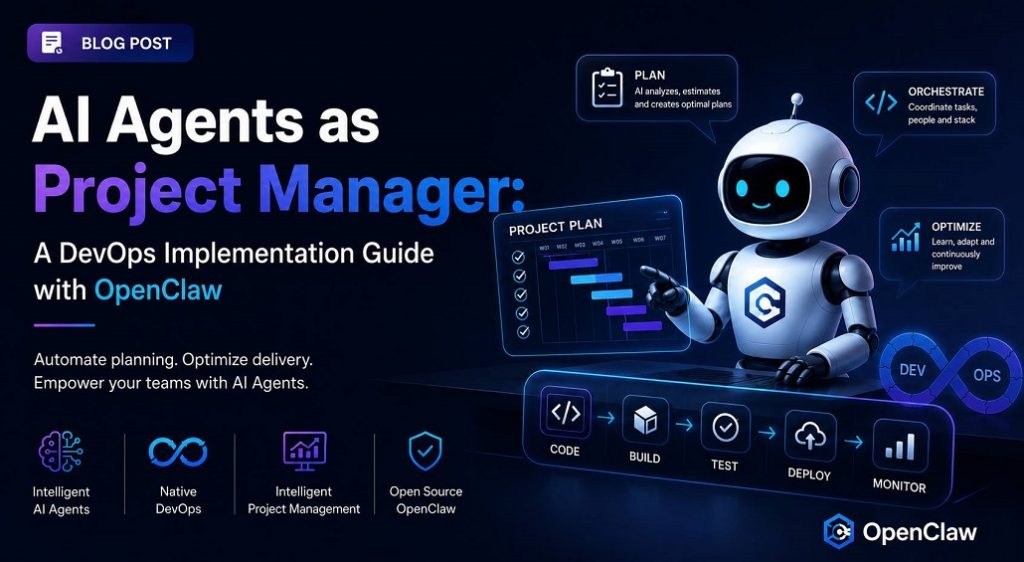
AI Agents as Project Managers: A DevOps Implementation Guide with OpenClaw
The project manager is gone. The team keeps delivering, but deadlines are starting to wobble. Blockers go unnoticed. Sprint planning turns into a guessing game. What seemed like a temporary absence transforms into an operational burden that erodes the team’s efficiency.
At OpsAnalytics, we encounter this story frequently. Technical leaders absorb project management responsibilities while trying to maintain their engineering work. This is not a lack of competence, but a visibility gap. And the solution doesn’t always involve hiring another PM: in many teams, the answer lies in building an AI assistant that acts as just another member of the team, connected to real tools and equipped with the context that traditional bots never achieve.
In this article, we will show you how to move from need to action by integrating AI agents into your DevOps stack, complete with code snippets, deployment pipelines, and the complete architecture that makes it possible for an agent to manage 70% of a PM’s operational workload.
The Hidden Work Slowing Your Team Down
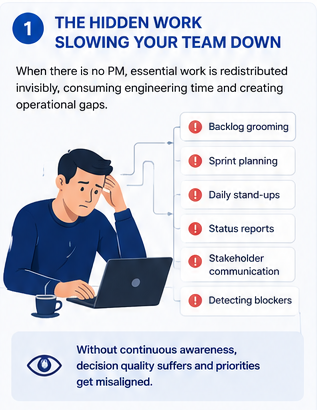
When a tech team is left without a Project Manager, the work doesn’t disappear. It is simply redistributed invisibly among those who weren’t hired to do it. Backlog grooming, sprint planning, facilitating daily stand-ups, crafting status reports, communicating with stakeholders, and proactively detecting blockers begin to consume valuable development hours.
The reality is that project management is not just about meetings and JIRA tickets. It is a job of continuous awareness: knowing where things stand, what is at risk, and what needs attention across the entire team. When this effort is diluted, decision quality suffers. Engineers prioritize tickets misaligned with sprint goals, two people work on overlapping problems without knowing it, or a blocker remains unresolved for three days because the person who could unblock it didn’t even know it existed.
The Cost No One Shows You
What nobody tells you about the true cost of operating without a PM is not limited to overtime. The true impact lies in the degradation of decision quality. Without an owner of the map, the team navigates blindly. In a recent project, a missed deadline revealed three tickets with unresolved dependencies on external API changes. By the time the mismatch was discovered, we had already lost two weeks. The conclusion was clear: we needed a structural solution, not a temporary patch.
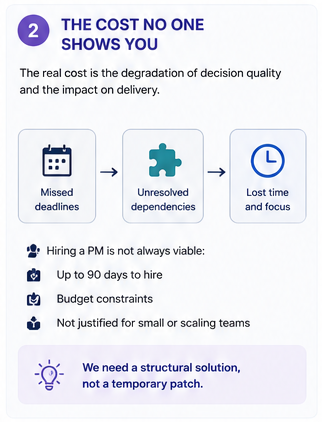
Hiring a PM is not always viable. Budget constraints, hiring lead times of up to 90 days, and the simple math of scale make this option unfeasible for many teams. Startups, small teams, and departments operating in that gray area where PM discipline is needed but a dedicated role isn’t justified require an alternative.
Why Traditional Tools Fall Short
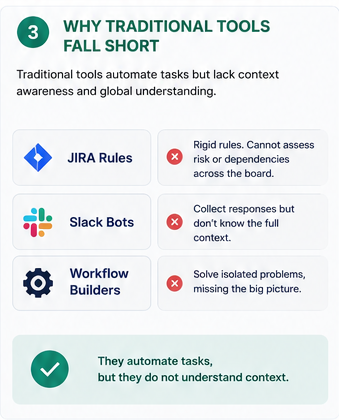
Before building an AI agent, we evaluated existing tools. JIRA automation rules are useful for simple triggers but are rigid: they cannot analyze a board and conclude that a sprint is at risk because three high-priority tickets haven’t moved in two days. They cannot read a Slack thread and detect that someone mentioned a blocker without creating a ticket. They operate on individual events, not the global context of the sprint.
Slack bots and workflow builders suffer from the same limitation. A stand-up bot collects responses but doesn’t know what’s on the JIRA board. A reminder bot sends notifications but is unaware of which ones are actually important. Each tool solves an isolated problem, lacking awareness of the big picture. What usually emerges is a patchwork of five bots that fail to deliver coherent management.
The fundamental problem common to all of them: they automate tasks, but they do not understand context.
The Paradigm Shift: AI Agents with Context Awareness
What is needed is a system with reasoning capabilities. An agent framework where an AI model has access to real tools, APIs, databases, and communication platforms, and can act based on its understanding of the situation. Instead of writing rigid rules, you describe in natural language what is expected of the agent, provide it with the necessary tools, and let the model determine the steps to take.
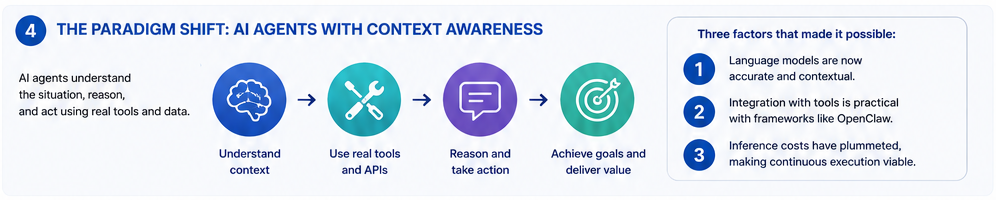
Three factors have converged to make this possible:
- Language models are now sufficiently accurate and contextual.
- Integration with tools has become practical through frameworks like OpenClaw.
- Inference costs have plummeted, making continuous execution viable.
Architecture of the PM Agent with OpenClaw
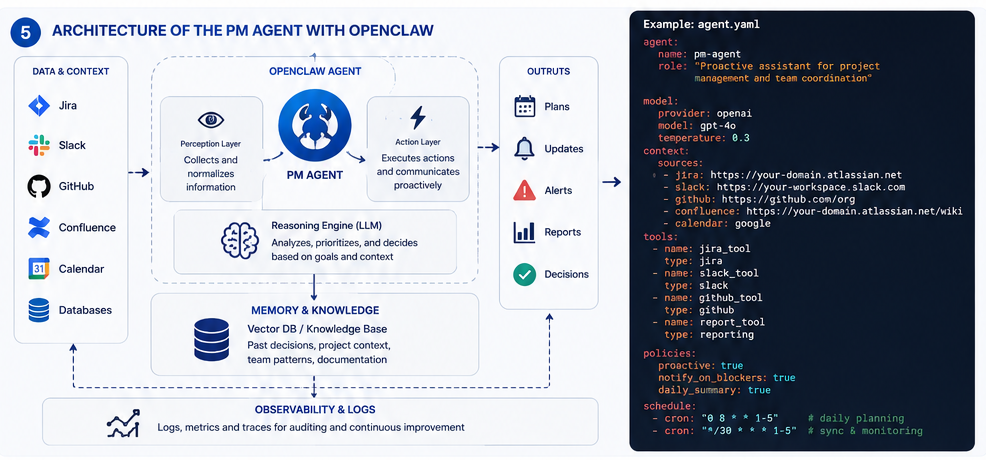
To build our project management assistant, we chose OpenClaw, an open-source AI agent framework specifically designed to integrate with real-world tools. Its philosophy aligns perfectly with DevOps principles: declarative configuration, separation of concerns, and automated deployment.
OpenClaw connects a language model (local or cloud-based) to external tools, manages agent behavior via configuration files, and handles operational complexity: conversation context management, retry logic on errors, tool call orchestration, and security boundaries.
1. Installation and Base Configuration
The agent is deployed as a container that exposes an API and connects to messaging services. For a production environment, we recommend packaging it with Docker and managing it via a CI/CD pipeline (which we will cover later). A minimal configuration starts with:
bash
# OpenClaw CLI Installation
curl -sSL https://openclaw.ai/install.sh | bash
# Interactive project initialization
openclaw init pm-agent
cd pm-agent
This generates a directory structure with the necessary configuration files: agent.yaml (general configuration), SOUL.md (agent personality and rules), and tools/ (external tool definitions).
2. Connecting to JIRA: Giving the Agent Vision of the Board
The first step is to give it full access to boards, sprints, and tickets. We use jira-cli as a bridge and a ClawHub skill to expose it to the agent. The configuration is defined in a tools/jira.yaml file:
yaml
tools:
– name: jira
type: clawhub
source: clawhub/jira-tool
config:
jira_url: “https://tu-dominio.atlassian.net”
auth:
type: api_token
email: “{{env.JIRA_EMAIL}}”
token: “{{env.JIRA_API_TOKEN}}”
default_project: “DEV”
board_id: 10
With this integration, the agent can execute JQL queries, read state transitions, create tickets, and extract sprint metrics. The language model translates natural language requests into the corresponding API calls.
3. Slack Integration: The Agent as Just Another Team Member
We use Slack Socket Mode, which does not require exposing public endpoints, simplifying security and deployment in corporate environments. We create a Slack app with the appropriate scopes (chat:write, channels:history, users:read) and enable Socket Mode. The configuration in agent.yaml looks like this:
yaml
channels:
slack:
bot_token: “{{env.SLACK_BOT_TOKEN}}”
app_token: “{{env.SLACK_APP_TOKEN}}”
socket_mode: true
default_channel: “#team-dev”
Once connected, the agent can:
- Read messages in channels where it is invited.
- Respond to commands like @pm-agent sprint summary.
- Send proactive notifications when detecting blockers.
- Collect asynchronous stand-ups via threads.
4. Defining Personality and Rules: SOUL.md
The agent’s intelligence depends not only on the model but also on the instructions it receives. The SOUL.md file defines its role, tone, rules of engagement, and boundaries. Here is a real fragment of the configuration we use:
# Role
You are a project management assistant for a software development team. Your goal is to maintain sprint health, detect blockers, and facilitate communication, without replacing human judgment in strategic decisions.
# Rules of Engagement
– Every Monday at 9:00 AM, publish a sprint summary in the #general channel.
– If a “High” or “Critical” priority ticket does not change state within 48 business hours, notify the assignee and the #dev-team channel.
– During the daily stand-up (when invoked), ask each member for their progress, blockers, and plan for the day, consolidating this information against the JIRA board.
– Never modify ticket assignments or priorities without explicit human confirmation.
– If you detect a potential sprint risk (anomalous burnup, accumulation of tickets in “In Progress”), suggest a review meeting to the team.
# Tone
Professional, direct, and action-oriented. Use bullet points for summaries. Be proactive but respectful of the team’s time.
This instruction layer is what transforms a generic model into a functional specialist. The team can iterate on this file with the same natural ease as improving their pipelines.
CI/CD for the AI Agent: Deploying Intelligence with Pipelines
At OpsAnalytics, we apply the same DevOps principles we preach to any software component, including the AI agent. This means automated pipelines, testing, versioning, and progressive deployment. Below is a real example of a GitHub Actions pipeline that builds, validates, and deploys the agent to a Kubernetes cluster.
Deployment Pipeline (deploy-agent.yml)
yaml
name: Deploy PM Agent
on:
push:
branches: [main]
paths:
– ‘pm-agent/**’
env:
REGISTRY: ghcr.io
IMAGE_NAME: opsanalytics/pm-agent
jobs:
build-and-test:
runs-on: ubuntu-latest
outputs:
image_tag: ${{ steps.meta.outputs.tags }}
steps:
– uses: actions/checkout@v4
– name: Set up Docker Buildx
uses: docker/setup-buildx-action@v3
– name: Login to Container Registry
uses: docker/login-action@v3
with:
registry: ${{ env.REGISTRY }}
username: ${{ github.actor }}
password: ${{ secrets.GITHUB_TOKEN }}
– name: Extract metadata (tags, labels) for Docker
id: meta
uses: docker/metadata-action@v5
with:
images: ${{ env.REGISTRY }}/${{ env.IMAGE_NAME }}
tags: |
type=sha,prefix={{branch}}-
type=ref,event=branch
– name: Build and push Docker image
uses: docker/build-push-action@v5
with:
context: ./pm-agent
push: true
tags: ${{ steps.meta.outputs.tags }}
labels: ${{ steps.meta.outputs.labels }}
cache-from: type=gha
cache-to: type=gha,mode=max
– name: Run configuration validation
run: |
docker run –rm -e JIRA_EMAIL=${{ secrets.JIRA_EMAIL }} \
-e JIRA_API_TOKEN=${{ secrets.JIRA_API_TOKEN }} \
${{ steps.meta.outputs.tags }} validate-config
deploy-staging:
needs: build-and-test
runs-on: ubuntu-latest
environment: staging
steps:
– uses: actions/checkout@v4
– name: Setup kubectl
uses: azure/setup-kubectl@v3
with:
version: ‘latest’
– name: Deploy to staging
env:
KUBE_CONFIG: ${{ secrets.KUBE_CONFIG_STAGING }}
run: |
echo “$KUBE_CONFIG” > kubeconfig.yaml
kubectl –kubeconfig=kubeconfig.yaml set image deployment/pm-agent \
pm-agent=${{ needs.build-and-test.outputs.image_tag }}
kubectl –kubeconfig=kubeconfig.yaml rollout status deployment/pm-agent
integration-tests:
needs: deploy-staging
runs-on: ubuntu-latest
environment: staging
steps:
– name: Run smoke tests against staging
env:
AGENT_API_URL: ${{ secrets.STAGING_AGENT_URL }}
SLACK_TEST_CHANNEL: ${{ secrets.SLACK_TEST_CHANNEL }}
run: |
curl -X POST “$AGENT_API_URL/trigger/daily-summary” \
-H “Authorization: Bearer ${{ secrets.AGENT_API_KEY }}” \
-H “Content-Type: application/json” \
-d ‘{“channel”: “‘”$SLACK_TEST_CHANNEL”‘”}’
deploy-production:
needs: integration-tests
if: github.ref == ‘refs/heads/main’
runs-on: ubuntu-latest
environment: production
steps:
– uses: actions/checkout@v4
– name: Deploy to production
env:
KUBE_CONFIG: ${{ secrets.KUBE_CONFIG_PRODUCTION }}
run: |
echo “$KUBE_CONFIG” > kubeconfig.yaml
kubectl –kubeconfig=kubeconfig.yaml set image deployment/pm-agent \
pm-agent=${{ needs.build-and-test.outputs.image_tag }}
kubectl –kubeconfig=kubeconfig.yaml rollout status deployment/pm-agent
Best practices incorporated in this pipeline:
- Early validation: The image is built and a validate-config command is run to check the syntax of SOUL.md and the accessibility of defined tools.
- Progressive environments: Staging receives the deployment first, and real integration tests are executed against Slack and JIRA.
- Immutability and traceability: Every deployment is linked to a specific commit via SHA-based image tags.
- Managed secrets: API credentials are never stored in the repository; they are injected at runtime from pipeline secrets.
This methodology brings CI/CD discipline to the agent’s lifecycle, allowing safe iteration and drastically reducing the time between detecting an improvement in SOUL.md and pushing it to production.
From Automation to Operation: Monitoring and Continuous Improvement
Deployment is just the beginning. To maintain the agent’s effectiveness, we integrate OpenTelemetry-based telemetry to observe its performance:
- Business metrics: Number of blockers detected, summaries generated, human interventions required. We expose these via Prometheus and visualize them in Grafana.
- Decision tracing: Every agent action is logged as a span, linking the Slack request with JIRA calls, the generated response, and team feedback. This is essential for auditing and fine-tuning behavior.
- Alerts: If the agent repeatedly fails to query JIRA or cannot connect to Slack, an alert is triggered in OpsGenie for the platform team to intervene.
The agent also integrates with the product’s own CI/CD pipeline: when it detects that a blocker is related to a build failure, it can suggest the developer review the last pipeline executed in GitHub Actions, closing the loop between project management and technical operations.
Results: From Chaos to Control Without Adding Headcount
After implementing the agent, teams we work with at OpsAnalytics report:
- 70% reduction in time spent on administrative project management tasks, freeing engineers for high-value development work.
- Blocker detection in under 2 hours (down from three days), thanks to continuous analysis of the board and communication channels.
- More predictable sprints: Shared visibility eliminated last-minute surprises.
- Immediate onboarding: A new team member receives historical sprint context through the agent without needing lengthy handover sessions.
These results do not depend on exceptional models, but on deep integration and lifecycle automation. The agent handles 70% of the operational work, and the human team focuses on the 30% that requires judgment: strategic prioritization, stakeholder management, and alignment with business objectives.
The Future of Tech Operations: Agents as a DevOps Practice
AI agents represent a fundamental shift in how we automate cognitive work. For DevOps and platform teams, project management is just the first use case. Other patterns we are already implementing include:
- Incident response agents that correlate Prometheus alerts with JIRA tickets and Confluence runbooks, guiding the on-call engineer through remediation.
- Compliance agents that automatically verify pipelines meet defined security controls, generating evidence for audits.
- Cloud cost optimization agents that monitor spending and propose rightsizing directly from the FinOps channel.
The key to success lies not just in the technology, but in how it is integrated into the team’s culture. An AI agent does not replace human judgment, but it eliminates the heavy lifting that prevents it from being exercised. Just as pipeline automation revolutionized software delivery, AI agents are poised to revolutionize work management.
The question is no longer whether you should explore this technology, but how to start building it today. And the answer lies in applying the same principles that made DevOps successful: continuous integration, automated deployment, observability, and iterative improvement.
OpsAnalytics is a consulting firm specializing in the transformation of tech operations. We help companies overcome infrastructure scalability challenges, CI/CD pipeline security risks, and bottlenecks that slow down innovation, by implementing cutting-edge DevOps, MLOps, and LLMOps practices. If you want to explore how AI agents can optimize project management (and much more) in your team, contact us for a personalized consultation. We will help you build, deploy, and operate your first agent with the same discipline we apply to any critical service.
Leave a Reply